Brik AI, now live on pilot sites v1.0 · LIVE

Intelligent construction,
without changing site habits.

One app for chat, attendance, drawings, meetings, mail and a live dashboard, with Brik AI built into every screen. Your team works the way they already do, and the developer's office stays in control of every project.

brikito · live
Skyline Residency · Tower B
Skyline Tower B, Site Team
10 · 9:18 AM
Brik AI · indent
awaiting PM
IND-2041 · Material indent
Needs approval
OPC 53 Grade Cement, 50 bags
LocationTower B · Block B, L8
Need byTomorrow, 8 AM
Raised bySuresh Patel
store check: only 12 bags left at site, approving makes sense
Now in pilot on live construction sites across India
The platform

The operating system for your construction site.

Plug the cost that leaks. Win back the time you lose chasing it.

The everyday work becomes a record, an approval, a report and a live view, without anyone on site learning a new way of working.

BRIK AI v1.0

Simplifying real estate developments with AI.

Brik is the AI woven through every screen, reading each message and drafting every reply, so the office stays in control from foundation to handover.

One app, every surface

Everything the site does, in one place.

The whole site runs in one app, with Brik AI at the centre. Every message is read, tagged and turned into something your office can act on the same day.

L-11 L-10 L-09 L-08 L-07 L-06 L-05 L-04 L-03 L-02 L-01 G SKYLINE RESIDENCY · TOWER B · 142 / 224 UNITS BRIK AI v1.0 · assistant LISTENING 7 langs CHAT · TAGGED ATTENDANCE · 48 DRAWING · REV 2 INDENT · 50 BAGS MoM · AUTO-DRAFT // FIG. 01 Brik reads every message, routes it to your office.
ChatGroups, DMs & Brik AI in one inbox
AttendanceSelfie check-in · live headcount
DrawingsVersion-controlled · latest tagged
IndentsRequest → structured → approved
DashboardProgress, manpower & flags
BRIKCHAT · IN DEVELOPMENT v1.0 · the chat with Brik AI inside

BrikChat, your site chat with Brik built in.

Brik reads every message, voice note, image and document your team posts and tags the intent: update, attendance, enquiry or ticket. Material requests become structured indents, progress feeds the dashboard, and every reply or order is drafted for your PM to approve before it sends. Anyone can also DM Brik privately and ask, in plain language, about stock, attendance, approvals or drawings.

A.Inside your project chats

Brik reads everything posted. You see the structured version.

Every voice note, image and document is captured with sender, time and type. Brik tags the intent, pulls out the figures, and turns it into something actionable, a material indent, an attendance count, a progress update, a flag, each one linked back to the original message. Replies and orders are drafted, never auto-sent.

CapturesVoice · Photo · Video · PDF · Drawing
LanguagesEN · HI · MR · TA · TE · KN · BN
TagsUpdate · Attendance · Enquiry · Ticket
Turns intoIndents · Approvals · Progress · Flags
Routes toDashboard · PM approval · Documents
BRIK AI · capture stream Skyline Tower B, Site Team this morning
8:42 Rajesh · Engineer TEXT UPDATE Slab L7 cast · 142 cum · cubes taken for testing
8:46 Anil · Supervisor TEXT ATTENDANCE 48 present · 3 absent · logged to dashboard
8:55 Fatima · Architect TEXT ENQUIRY L4 plumbing layout, reached site? · Rev 2 linked
9:02 Priya · PM VOICE 0:34 UPDATE Transcribed · “Rev 2 is on the Project tab, latest tagged”
9:18 Suresh · Contractor TEXT TICKET 50 bags OPC 53 · Block B · indent IND-2041 raised
9:18 Brik AI INDENT ROUTED Structured · sent to Priya (PM) · awaiting approval
6 of 142 messages today + 3 approvals awaiting Priya (PM)
B.Privately, with Brik

Anyone on the project can DM Brik like a person.

The engineer checking cement stock. The contractor chasing an approval. The PM glancing at progress before a client call. Any team member opens a private chat with Brik and asks in plain language, and Brik answers from live project data, scoped to what their role is allowed to see, and can draft the order or message right there.

AskShow last week's progress
AskMy attendance last month
AskDraft a material order
AskPending approvals
ScopeEach person sees only what their role permits, across every project.
B
Brik online · always on
Cement stock in Tower B? 15:40
Tower B · OPC 53 Cement On hand · 12 bags at site store Open indent · IND-2041 · 50 bags Below reorder level. Draft a PO to UltraTech? 15:40
Yes, draft it 15:41
PO-2291 · drafted 50 bags OPC 53 · vendor UltraTech Sent to Priya (PM) for approval. I'll confirm here once signed. 15:41
My attendance last month? 15:42
Attendance · last month Days present · 22 / 24 Total hours · 198 h · on-site 92% 15:42
BRIKVISION · 24/7

See the site without standing on it.

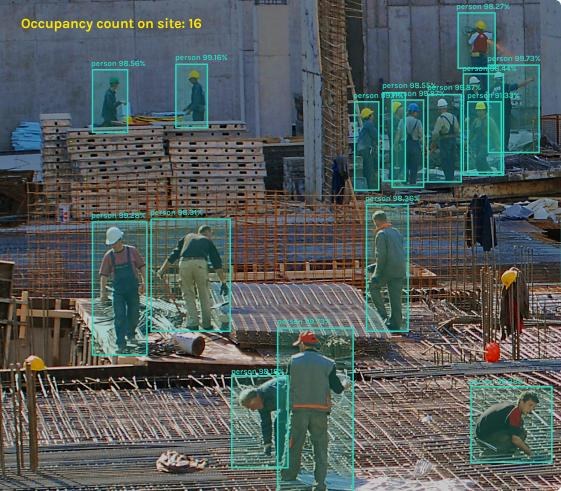
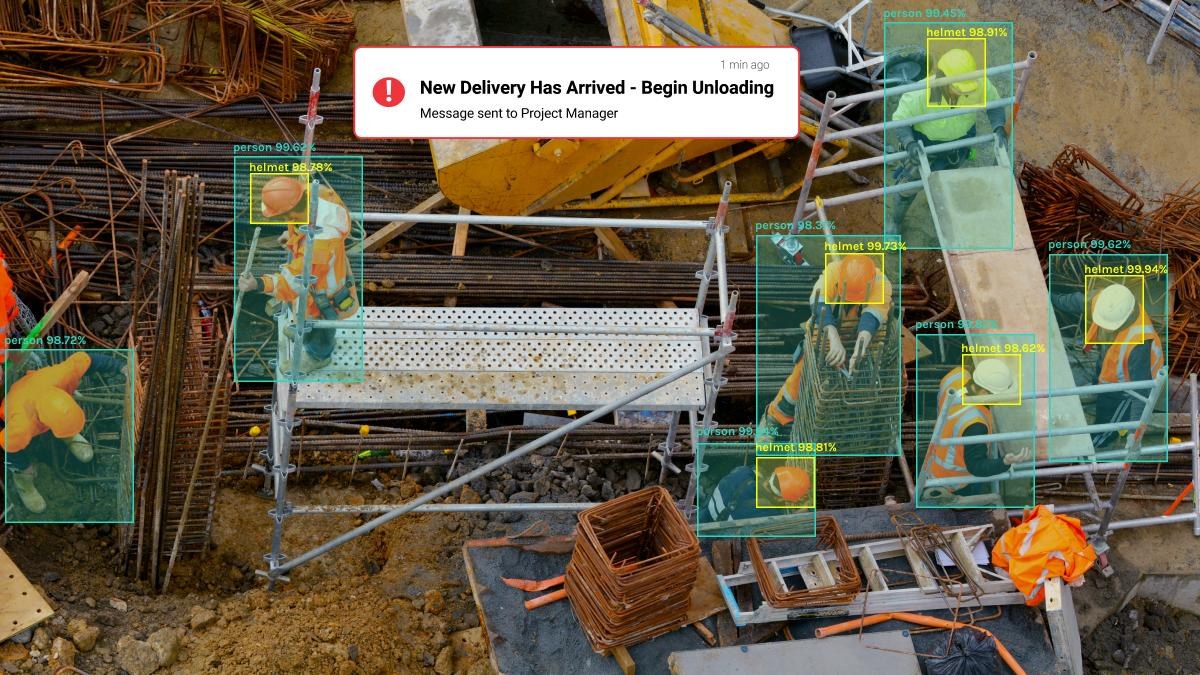
BrikVision watches your site CCTV around the clock and understands what it sees, counting people, spotting deliveries, checking PPE and tracking progress. Look in any hour of the day, from anywhere, and cut site visits and follow-up calls in half.

Live site progress
Material movement
Labour presence
Work productivity
Supervision & safety
Round-the-clock monitoring
50%
fewer site visits and follow-up calls, on average.
LIVE Skyline Tower B · 4 cameras 09 Jun · 14:32
Site camera detecting workers, helmets and a delivery CAM 01 · GATE REC 14:32:08 delivery in
Site camera counting people on site CAM 02 · WORK ZONE REC 14:32:08 headcount · 16
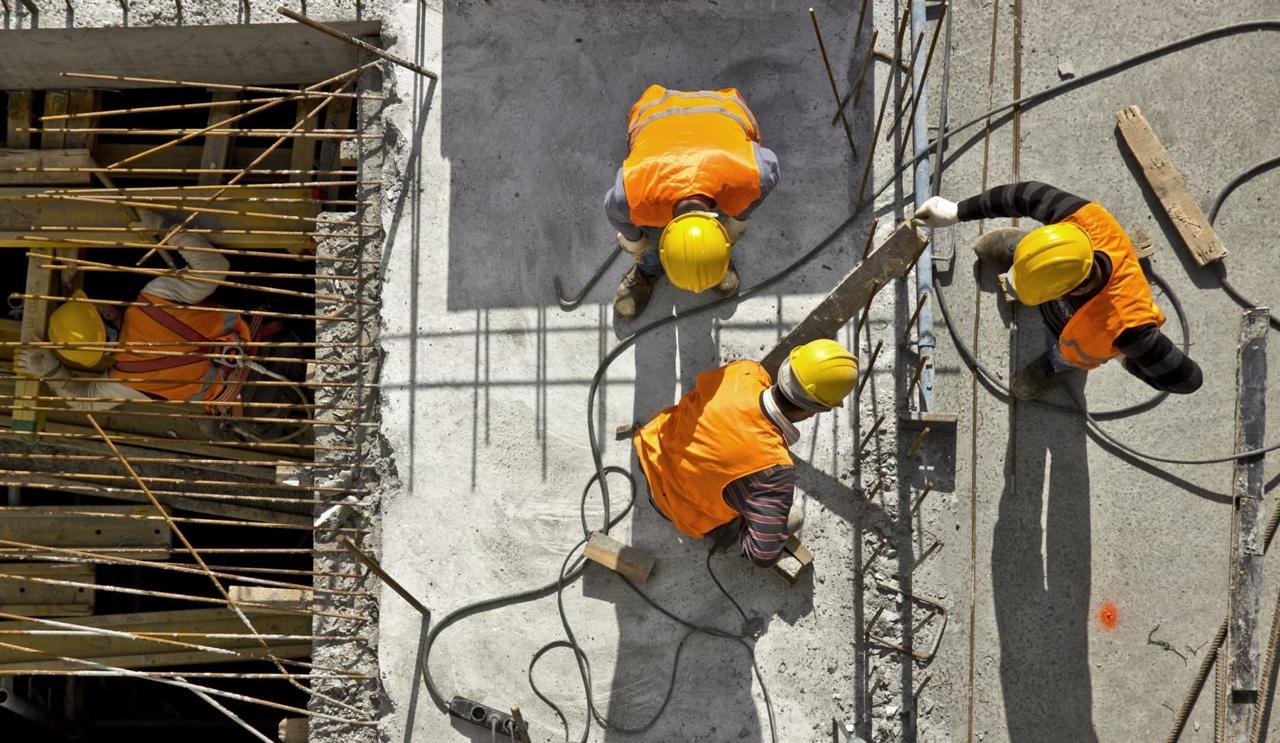
Overhead site camera tracking workers CAM 03 · TOWER B REC 14:32:08 crew active
Site camera viewing formwork and slab work CAM 04 · FORMWORK REC 14:32:08 pour ready
One app, six tabs

Six tabs. One login.

Brikito replaces the scatter of WhatsApp, attendance registers, drawing folders, email and spreadsheets with one app, and Brik AI runs through all of it.

01

Chats

Group chats, DMs and Brik AI in one inbox. Every message auto-tagged, update, attendance, enquiry or ticket, with voice notes and polls built in.

GROUPS · DMs · BRIK AI
02

Brik AI

Ask anything in plain language. Brik surfaces pending approvals, drafts replies and purchase orders, and answers from live project data.

ASK · DRAFT · APPROVE
03

Attendance

Selfie check-in and check-out at the site. Live on-site headcount, days present, hours and on-site percentage, no register, no proxy.

SELFIE · LIVE HEADCOUNT
04

Dashboard

Progress vs plan, days behind, open tickets, manpower trend, material status and safety & quality flags, updated as the site chats.

PROGRESS · MANPOWER · FLAGS
05

Documents

Drawings, structural plans, BOQ, agreements and certificates, version controlled, with the latest revision always tagged on site.

VERSION-CONTROLLED · LATEST TAGGED
06

Meet & Mail

Video calls with AI Minutes of Meeting auto-drafted, and a project mailbox where Brik writes replies and orders for you.

AI MINUTES · BRIK-DRAFTED MAIL
BrikDocs

Every report your project needs, generated in a tap.

No more late nights in Excel. Brik builds the documents from the work your team already logged, ready to share or print.

One tap, ready in seconds
BBS BOQ Estimation Schedule Fabrication Drawing DPR DLR GRN Stock Statement + more
How it works

Watch a site run itself.

One short story, from the morning rush to an approved day. Prefer to drive it yourself? Open the interactive demo below.

BRIKITO · STORY
06:30 · ON SITE
The site wakes up. Cranes, crews, a hundred moving parts.
09:18 · IN THE GROUP CHAT
A need, typed in plain chat. Brik turns it into an indent.
09:21 · AT THE OFFICE
One click to approve. The site is told the same second.
18:00 · END OF DAY
Progress, people and money, already on the dashboard.
0:00 / 0:19
What it does for the site

The everyday jobs, done in the app.

The scattered, lost, end-of-day work, now a tap, in the place the team already works.

TAB
SCENARIO
OUTCOME
SURFACE
Chats
Material request · spoken in the group
“Need 50 bags cement at Block B” becomes a structured indent, routed to the PM to approve in a tap.
Indent
Attendance
Check-in · a selfie at the gate
Live on-site headcount, days present and hours, no register, no proxy, no month-end reconciliation.
Headcount
Documents
Drawing on site · always the right revision
L4 plumbing Rev 2 tagged as latest. The crew never chases walls off a superseded print again.
Version
Dashboard
Schedule slip · caught at day one
62% actual against 68% planned, 9 days behind, surfaced live, not discovered at quarter-end.
Schedule
Brik AI
Pending approvals · cleared from your pocket
Three approvals waiting, indent, overtime, drawing sign-off, approved or rejected inline in chat.
Approvals
Meet
Site review call · minutes write themselves
AI Minutes of Meeting drafted the moment the call ends. No one scrambles to remember who owns what.
AI MoM
Mail
Vendor email · Brik drafts the reply
Purchase orders and replies written from live project data, sitting in Drafts ready for one-tap review.
Drafted
Dashboard
Safety & quality flags · raised in chat
Edge protection missing at L7, honeycombing on L6, flagged from the group, surfaced on the dashboard.
Flags
Pilot · 2026

One app in place of six.

6→1
WhatsApp, registers, drawings, email and spreadsheets, now one app.
3
Live projects run from one login, residential, metro and logistics.
92%
On-site attendance, captured by selfie. No register, no proxy.
9d
Schedule slip surfaced live on the dashboard, not at quarter-end.
"My whole site runs in one app now, and I approve the day's indents before I've finished my chai."
SR Ilangovan, Director
Gofar Group
PILOT · 2026
Commitments

Four non-negotiables, written before the code.

i. Authority

Your PM is the checker. Always.

Nothing is auto-sent. Every reply, indent and order is drafted by Brik and held until your project manager approves it. Authority preserved. Record intact.

ii. Grounding

Answers from your project. Nothing else.

Every figure Brik gives, stock, attendance, progress, drawings, comes from your live project data, not a generic template or an invented number.

iii. Adoption

Built for the site, not the office.

One app, in the languages the crew speaks, as simple as the chat they already use. The single largest reason construction software fails is that the site won't touch it, so Brikito is designed for the people on the ground first.

iv. Privacy

Selfie is presence, not surveillance.

Attendance confirms someone is on site, it doesn't track or identify beyond that. Each person sees only what their role permits, scoped per project. Data is hosted in India and exportable on demand.

What's next

Brikito, building the AI Operating System for Real Estate Development.

BrikChat is in active development. BrikDocs, BrikMail and BrikVision follow, building toward one operating system that runs your project from foundation to handover.

01
IN DEVELOPMENT

BrikChat

The site chat with Brik AI inside, capture, tag, structure and approve, all in one place.

02
NEXT

BrikDocs

Version-controlled drawings and one-tap reports, BBS, BOQ, DPR, GRN and more.

03
On the runway

BrikMail

A project mailbox where Brik drafts replies and purchase orders from live data.

04
On the runway

BrikVision

AI on the site CCTV, 24/7, headcount, deliveries, PPE and progress in one view.

Put your next project on Brikito.

45 minutes. We'll set your team up on one live project and have it running the same day.