See your site without standing on it.
BrikVision adds AI to the CCTV already on your construction site. It counts who is on site, spots every delivery, checks helmets and vests, and tracks how far the work has moved, around the clock. Look in on any site, any hour, from your phone.
 CAM 01 · SITE ACTIVITYREC14:32:08crew active
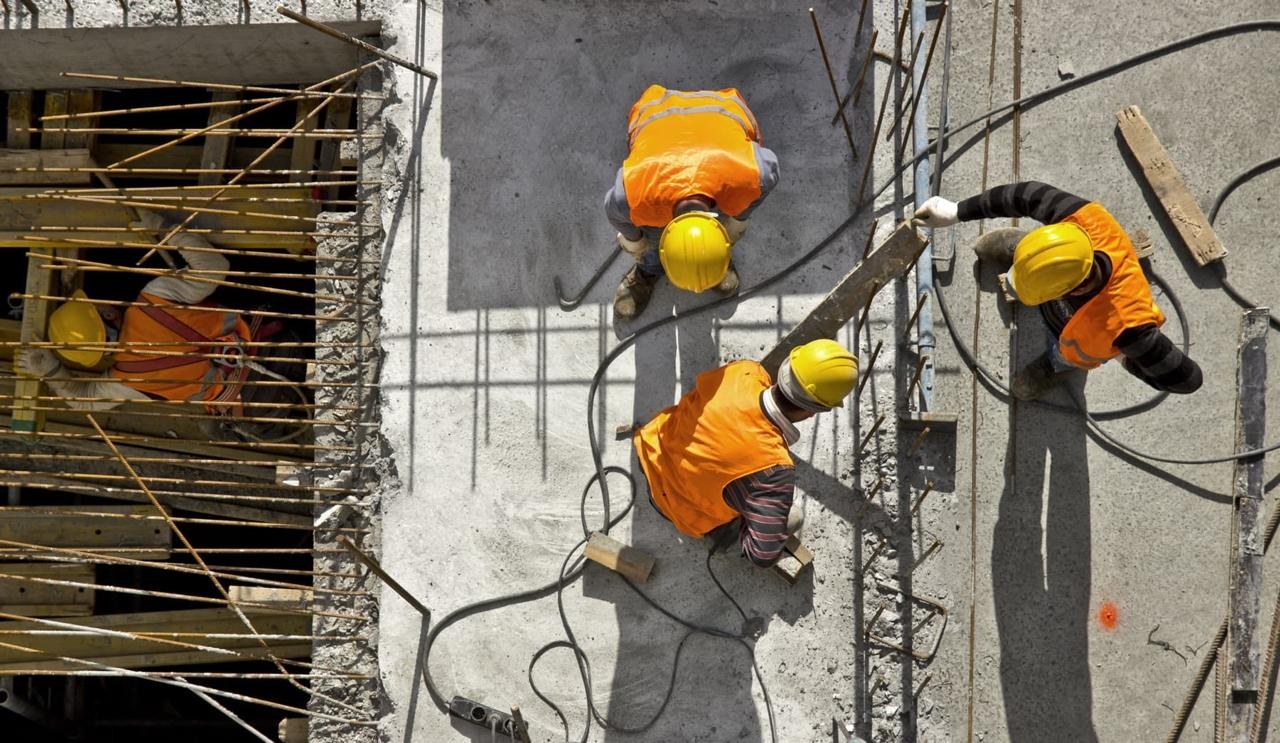 CAM 02 · WORK ZONEREC14:32:08formwork active
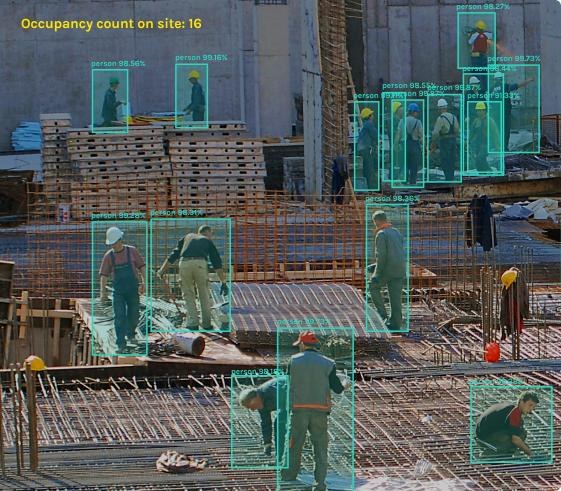 CAM 03 · OCCUPANCYREC14:32:08headcount · 16
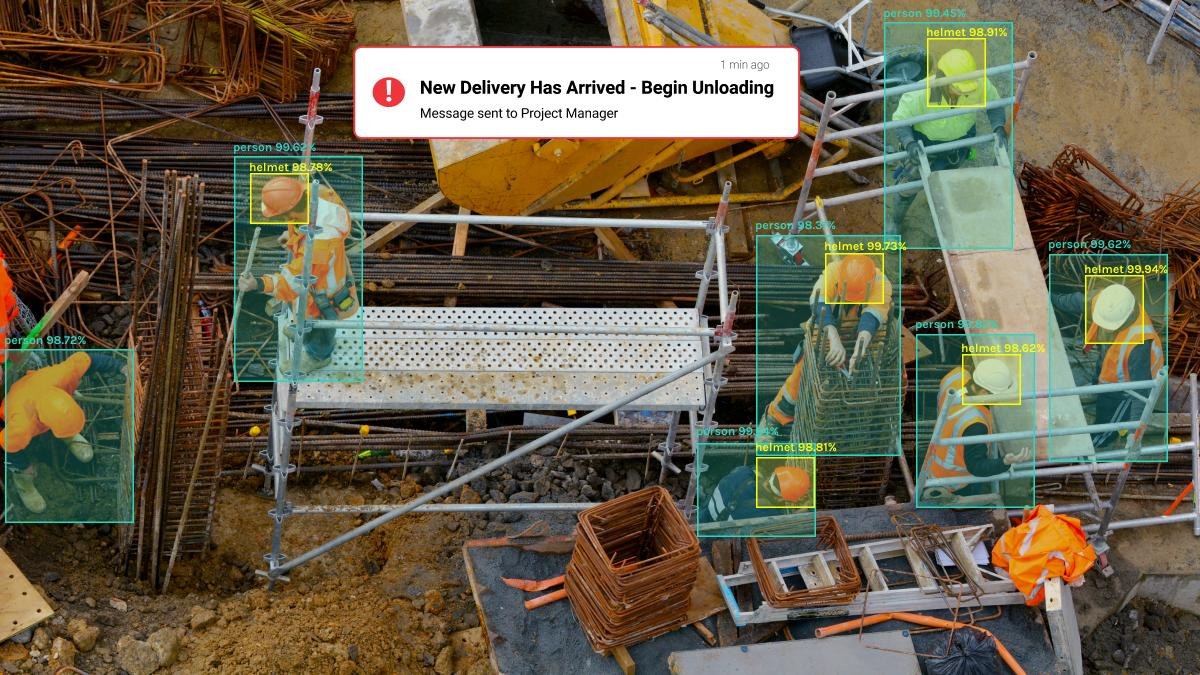 CAM 04 · SAFETY / PPEREC14:32:08helmet detection
Your site has cameras. Nobody has time to watch them.
Most sites already record every hour of the day. The footage only gets opened after something goes wrong. BrikVision turns those feeds into answers you can use while the work is still happening.
Site visits just to check.
Managers drive across the city to see whether the crew turned up and the slab work started.
Hours of footage, zero answers.
When a delivery is disputed or an incident happens, someone scrubs through a day of video to find one minute.
Headcounts that don't add up.
The register says 48. The contractor bills for 52. Nobody can say how many were actually working.
Six things BrikVision watches for you.
BrikVision runs on every camera, every hour, and turns what it sees into numbers, logs and alerts that land in BrikChat and on your project dashboard.
From recording the site to understanding it.
Computer vision on your construction cameras and site photos, connected to the rest of your project in Brikito.
Live headcount
Count people on site and in each zone, hour by hour, and compare it with attendance and contractor bills.
Deliveries & material movement
Log every truck in and out at the gate, and read delivery notes so receipts can be verified against POs.
PPE & safety checks
Detect missing helmets and safety vests and people in restricted zones, with the frame sent to your safety lead.
Progress monitoring
See which zones are active and how visible work is moving, so you know a slab started without calling the site.
Photo quality checks
Site photos posted in chat are checked for quality and PPE issues before they become rework or an incident.
Every site, one screen
Look in on any project, any hour, from your phone, with events searchable by camera, time and type.
Your cameras. Brik's eyes.
Connect your CCTV
Our team connects the cameras already on site and checks coverage of the gate, work zones and stores.
Mark your zones
Define work zones, restricted areas and the gate, and choose who should hear about what.
Brik watches 24/7
Every feed is analysed continuously for people, PPE, deliveries and activity.
You get answers, not footage
Counts, logs and alerts land in BrikChat and the dashboard, each with the frame that proves it.
Oversight for every site. Without the drive.
Check every site from one screen.
See which projects are active, staffed and safe right now, without a round of calls.
Fewer trips, faster decisions.
Confirm progress and deliveries remotely and spend site visits on the problems that need you.
See the gap while it's happening.
PPE and zone alerts arrive with the frame, so you can act on site the same hour.
Every delivery, on record.
Gate logs and delivery notes give you evidence when quantities or timings are disputed.
Brik flags. A person decides.
BrikVision, answered.
What is AI CCTV monitoring for construction sites?
AI CCTV monitoring uses computer vision on a site's camera feeds to understand what is happening, not just record it. Instead of someone watching hours of footage, the software counts people, detects deliveries, checks for helmets and safety vests, and tracks visible progress, then reports it as data and alerts.
Do I need to buy new cameras for BrikVision?
BrikVision is designed to work with the CCTV cameras already installed on your site. During the pilot our team checks your camera setup and placement and recommends changes only where coverage is missing.
What can BrikVision detect on a construction site?
BrikVision tracks labour presence and headcount, material deliveries and movement, PPE such as helmets and safety vests, activity in work zones, and visible progress. Site photos can also be checked for quality and PPE, and delivery notes read and matched against receipts.
How does AI CCTV improve construction site safety?
It watches every camera continuously and flags safety gaps, such as workers without helmets or people in restricted zones, as they happen. Supervisors get an alert with the camera, time and frame, so they can act on site the same hour instead of discovering it later.
Does a person review BrikVision alerts?
Yes. BrikVision flags and counts; a person decides. Alerts go to the right supervisor with the evidence attached, and nothing is reported against a worker or contractor without someone reviewing it.
Is BrikVision available now?
BrikVision is on the Brikito roadmap and is part of the Enterprise plan, with pilots available on request. Book a demo to discuss a pilot on one of your sites.
Explore the rest of Brikito.
The AI assistant built for construction.
Ask anything about your project and let Brik draft the paperwork.
Explore Brik AI BrikChatThe site chat with Brik inside.
Group chats, DMs and voice notes, each message tagged and turned into work.
Explore BrikChat BrikDocsEvery report, generated in a tap.
DPR, BOQ, BBS, GRN and more, built from the work already logged.
Explore BrikDocsPut AI on your site cameras.
Tell us about your sites and camera setup. We'll scope a BrikVision pilot on one live project.