
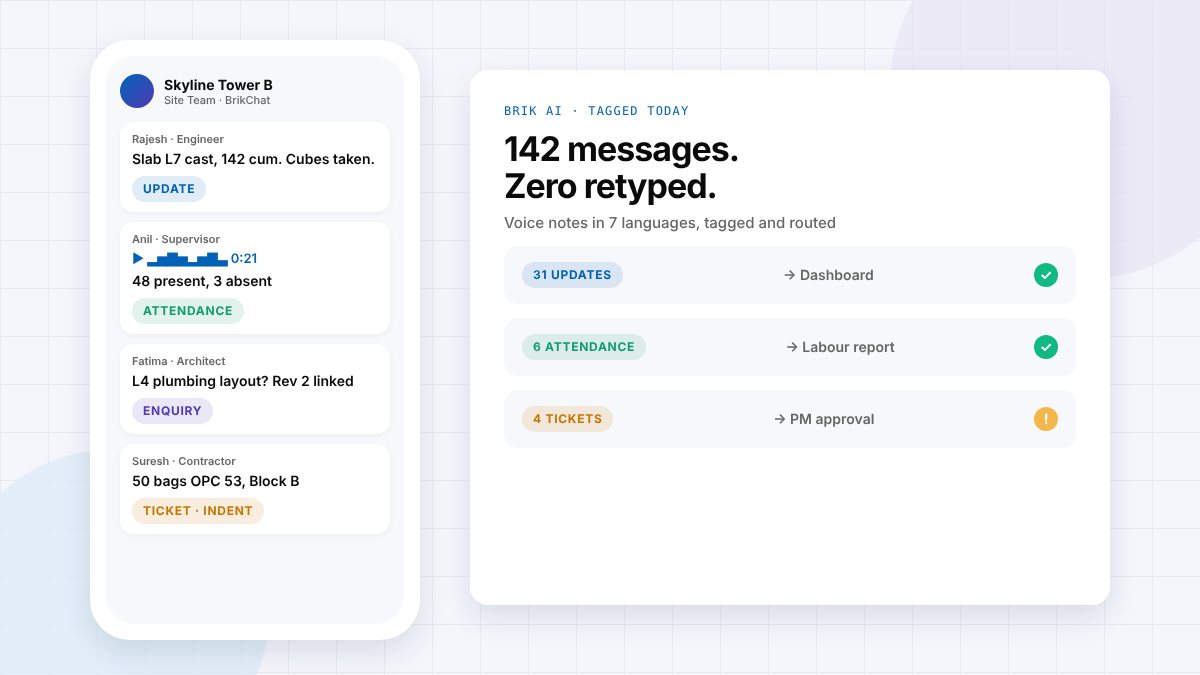
The short answer: An AI construction site chat is a project messaging app that reads every message, voice note and photo, works out what it is (an update, an attendance count, a question or a problem) and turns it into a structured record such as a progress update or a material indent. It keeps the speed of WhatsApp but adds what WhatsApp lacks: structure, ownership, search, approvals and a project-owned history. BrikChat is Brikito's AI site chat for construction teams.
A contractor sends a 20-second voice note in Tamil at 9:18 am: fifty bags of OPC 53 cement for Block B, needed tomorrow. On most projects, that note sits in a WhatsApp group until someone listens to it, writes it into a register, phones the PM for approval and emails the vendor. With luck, it is ordered by evening.
With an AI site chat, the note is transcribed, recognised as a material request, turned into an indent with quantity, grade and location, checked against stock, and placed in front of the PM for one-tap approval before lunch. This article explains how AI construction chat works, why WhatsApp groups struggle on site, and what to look for.
Why WhatsApp groups fail as a construction management tool
WhatsApp became the default site tool because it is fast, free and everyone already has it. The problems start when a project depends on it:
- A message isn't a record. Quantities, approvals and drawing revisions get lost in the scroll.
- Voice notes can't be searched. The office listens to them one by one.
- Too many groups. One per block, trade and contractor, so the right person is always in the wrong group.
- Nothing has an owner or status. A request posted to a group is everyone's job, so it is nobody's.
- History lives on personal phones. When a site engineer leaves, the project's context leaves too.
- The office retypes everything into Excel, registers and reports every evening.
We covered the wider communication problem in our construction site communication guide. AI site chat is a practical way to fix it without asking the site to change how it talks.
How AI construction site chat works
- Someone posts a message, voice note, photo or PDF in the project chat, in the language they normally use.
- The AI reads it. Voice notes are transcribed; text, figures and attachments are understood.
- The AI tags it by intent: update, attendance, enquiry or ticket. Chit-chat is ignored.
- The AI structures it. A material request becomes an indent with quantity, grade and location; a progress message updates the dashboard; a safety photo becomes a ticket for the right person.
- A person approves. Indents, POs and replies are drafted, never auto-sent. The PM approves from the source message.
- Everything stays searchable and linked to the project, so anyone with access can ask "has Rev 2 of the L4 layout reached site?" and get the answer with its source.
WhatsApp groups vs AI construction chat
| WhatsApp groups | AI site chat (BrikChat) | |
|---|---|---|
| Material requests | Retyped by hand | Structured indent, routed for approval |
| Voice notes | Listened to one by one | Transcribed in 7 languages and tagged |
| Attendance and progress | Copied into Excel | Flow to the live dashboard |
| Drawings | Old revisions re-forwarded | Latest revision linked in the thread |
| Access | Everyone in the group sees everything | Role-based, per project |
| When someone leaves | History leaves on their phone | History stays with the project |
| Finding answers | Scroll up and hope | Ask Brik, get the source |
The four message types an AI site chat should recognise
| Tag | Example message | What happens |
|---|---|---|
| Update | "Slab L7 cast, 142 cum. Cubes taken." | Progress recorded against the activity; feeds the DPR and dashboard |
| Attendance | Voice note: "48 present, 3 absent" | Headcount logged for the day; feeds the labour report |
| Enquiry | "L4 plumbing layout?" | Answered with the latest drawing revision linked in the thread |
| Ticket | Photo: "Open edge, L6 stairwell" or "50 bags OPC 53, Block B" | Routed to the right person as a safety issue or indent, with status tracked |
Why language support decides whether AI chat works
On Indian, Gulf and Singapore sites, the people with the most important information often don't type in English. An AI chat that only understands English quietly drops most of the site's knowledge. BrikChat transcribes and understands voice notes and messages in English, Hindi, Marathi, Tamil, Telugu, Kannada and Bengali, so a supervisor in Chennai can report in Tamil and a supervisor in Bengaluru in Kannada, and the office receives the same structured record.
What changes for each person on the project
- Site engineers and supervisors: report the way they already talk. No forms, no end-of-day Excel.
- Project managers: see the day already structured, with every pending approval in one place.
- Contractors and vendors: get answers on indents, approvals and drawings without chasing.
- Developers and owners: a searchable record of every decision, kept with the project and not on someone's phone.
What to look for in an AI chat app for construction
- Does it feel as easy as WhatsApp for a supervisor?
- Does it understand voice notes in your crews' languages?
- Does it turn requests into records with status and owner, not just summaries?
- Does a person approve everything the AI drafts?
- Is access role-based, with history owned by the project?
- Does it connect to attendance, materials, drawings and reports, or is it just another chat?
BrikChat: Brikito's AI site chat
BrikChat gives each project one chat in place of scattered WhatsApp groups, with groups by project, block, trade or contractor, private DMs and a private chat with Brik. Brik, the AI built into Brikito, tags every message and voice note, raises indents and drafts POs for approval, sends progress and attendance to the live dashboard and links the latest drawing revision when someone asks. Nothing is replied to or ordered automatically.
BrikChat is in active development and first on Brikito's roadmap; book a demo to join early access. Learn more on the BrikChat page, or see how it fits with Brik AI and BrikVision AI CCTV.
Frequently asked questions
What is the best WhatsApp alternative for construction teams?
The best alternative keeps WhatsApp's speed but adds structure: project-owned groups, role-based access, searchable history and AI that turns messages and voice notes into records such as indents, attendance and progress updates. BrikChat is built as a WhatsApp alternative for construction teams with these features.
Can AI understand construction voice notes in Tamil or Hindi?
Yes. Brik AI transcribes and understands voice notes and messages in English, Hindi, Marathi, Tamil, Telugu, Kannada and Bengali, and tags them by type.
Does the AI send messages or place orders automatically?
No. In BrikChat, Brik drafts replies, indents and orders, and a person approves before anything is sent.
Do site teams need training to use AI site chat?
Very little. If a supervisor can send a WhatsApp message or a voice note, they can use BrikChat.
What happens to chat history when someone leaves the project?
In BrikChat, groups and history belong to the project, not to personal phones. New members see history according to their role.
Is BrikChat available now?
BrikChat is in active development with early access. Book a demo with the Brikito team to join.
Keep the speed. Lose the chaos.
Site teams will keep using chat, because it is the fastest way to work. The question is whether that chat stays a scroll of lost messages or becomes the project's record. AI site chat makes the second possible without asking anyone on site to fill in a form.