
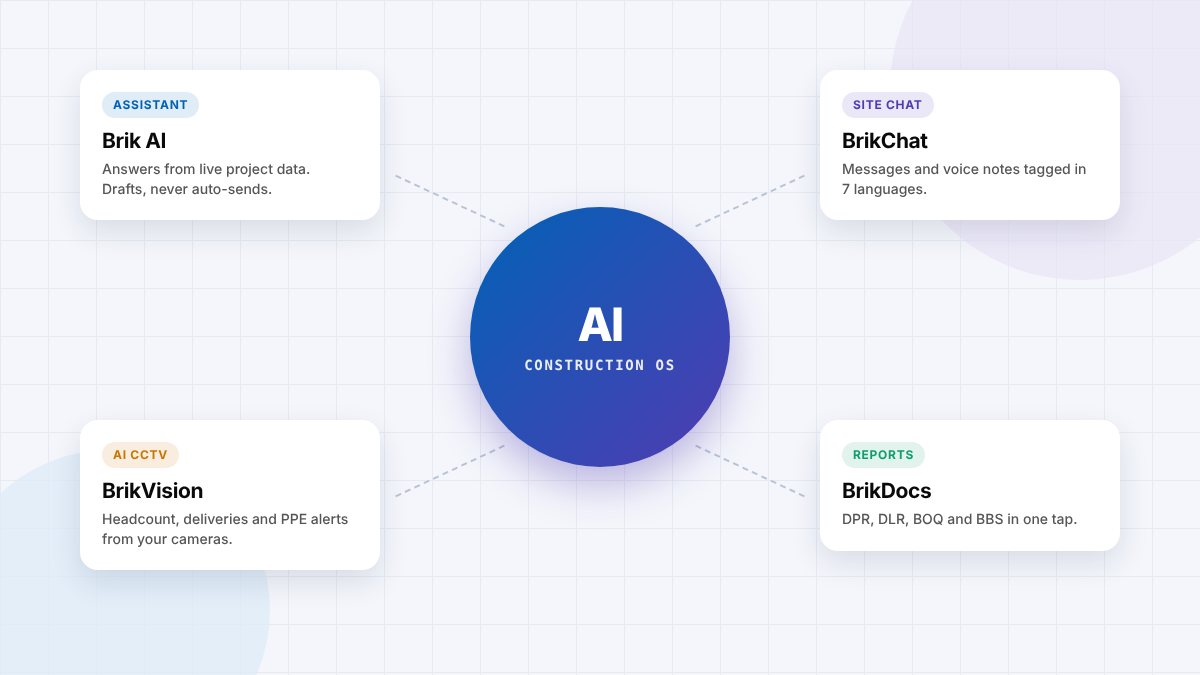
The short answer: The best AI construction management software is the one that answers your team's questions from live project data, turns site messages, voice notes and camera feeds into structured records, and keeps a person in charge of every approval. For developers and contractors in India, the UAE and Singapore, Brikito is built for exactly that: an AI construction management app with Brik AI, BrikChat site chat, BrikVision AI CCTV and BrikDocs reports in one place. Large international projects may also look at platforms such as Procore, Autodesk Forma and Buildots.
A note on this article: this is Brikito's own blog, and Brikito is one of the tools discussed. We have tried to be specific about what each type of tool is good at, including where other products may suit you better. Product details for other vendors come from their public announcements, linked below; check current features with each vendor before you buy.
Search for "best AI construction app" and you will find hundreds of products claiming to use AI. Some use it to read drawings, some to track progress from 360° photos, some to write daily logs, and some simply add a chatbot to an existing tool. For a builder deciding what to buy, the question is not "does it have AI?" but "will the AI save my team time on the problems we actually have?"
This guide explains what AI construction management software does today, what to look for, the main types of tools and how to choose. It also explains, honestly, where Brikito fits.
What is AI construction management software?
AI construction management software uses artificial intelligence, mainly large language models and computer vision, to do work that used to need a person to read, type, watch or search. In practice, that means:
- Understanding site messages: reading chat messages and voice notes, working out whether each is an update, a material request, an attendance count or a problem, and recording it.
- Answering questions: "How much cement did we use this week?" or "Which activities are behind plan?", answered from project data rather than someone's memory.
- Drafting paperwork: daily progress reports, purchase orders, replies to vendors and client updates, prepared for a person to check.
- Watching the site: AI CCTV and computer vision that count workers, log deliveries, check PPE and show progress.
- Flagging risk: low stock, slipping activities, open safety issues and overdue approvals.
What makes AI construction software "the best": 8 criteria
- Grounded answers. The AI should answer from your project's own records and show the source, not guess.
- A human approves. Nothing should be sent, ordered or published without a named person approving it.
- Site adoption. If supervisors won't use it, the AI has nothing to work with. Look for chat and voice input that feels as easy as WhatsApp.
- Language support. On Indian, Gulf and Singapore sites, crews speak Tamil, Hindi, Kannada, Telugu, Bengali, Malayalam and more. The AI must understand them.
- Works with what you have. Existing phones, existing CCTV, existing drawings and formats.
- Role-based privacy. Each person sees only what their role allows; workers' attendance is presence, not surveillance.
- Data location and export. Know where your data is hosted and that you can take it with you.
- Fit for your size. A 3-project developer and a 300-project contractor need different tools and pricing.
Top AI construction management tools in 2026, by type
| Tool | What its AI focuses on | Best suited to |
|---|---|---|
| Brikito | Brik AI assistant answering from live project data; BrikChat AI site chat that tags messages and voice notes in English and six Indian languages; BrikVision AI CCTV for headcount, deliveries and PPE; BrikDocs one-tap DPR, DLR, BOQ and BBS reports. The PM approves everything Brik drafts. | Developers and contractors in India, the UAE, Singapore and Sri Lanka who run sites on WhatsApp, registers and Excel and want one AI construction app their site team will use |
| Procore | Procore Helix AI, with Procore Assist (including jobsite photo analysis and voice tools) and an Agent Builder with pre-built agents such as RFI creation and daily logs (Procore, Oct 2025) | Larger general contractors and owners already standardised on Procore |
| Autodesk Forma (formerly Autodesk Construction Cloud) | Autodesk Assistant and agents, including a daily log agent that turns spoken field updates into structured logs (Architosh, Sep 2026) | Teams working in Autodesk design and BIM tools |
| Buildots | Computer vision that tracks progress from 360° cameras mounted on site managers' hard hats and flags delay risks (TechCrunch, May 2025) | Large projects that want detailed progress tracking against the plan |
| Local construction apps in India | Varies: many focus on site reporting, labour and materials, with AI features at different stages | Small contractors who want a simple, India-priced app; check AI claims in a demo |
The tools are not direct substitutes. Global platforms are strongest on large, document-heavy projects and BIM workflows. Brikito is designed for the problem most small and mid-size builders in India and the Gulf actually have: the site runs on chat, and the office spends its day chasing and retyping what the site said.
Why Brikito is a strong choice for AI construction management
Brik AI: an AI assistant built for construction sites
Brik reads every message, voice note and document on the project and answers questions in plain language: progress, cement stock, attendance, delays and pending approvals, with the source linked. It drafts replies, material indents, POs and client updates, and routes them to the right person. Nothing goes out until a person approves it. Read more on the Brik AI page.
BrikChat: AI site chat in place of WhatsApp groups
BrikChat is a project chat that feels like WhatsApp but works like a system. Brik tags each message as an update, attendance, enquiry or ticket, transcribes voice notes in English, Hindi, Marathi, Tamil, Telugu, Kannada and Bengali, and turns "need 50 bags OPC 53 for Block B" into a structured indent for the PM. BrikChat is in development with early access; see AI construction site chat for how it works.
BrikVision: AI CCTV for construction sites
BrikVision adds AI to the CCTV you already have. It counts people by zone and hour, logs deliveries at the gate, detects missing helmets and vests, and shows which zones are active, with alerts and the frame sent to the right person. Pilots are available on request; see AI CCTV for construction sites.
BrikDocs and the dashboard
Because the day's work is already captured, BrikDocs generates the DPR, DLR, GRN, stock statement, BOQ and BBS in a tap, and the dashboard shows progress vs plan, manpower and material status across projects.
Principles that matter for AI
- Your PM is the checker. Brik drafts; people approve.
- Grounded answers. Every figure comes from live project data, linked to its source.
- Built for the site. Seven languages, typed or spoken.
- Privacy. Role-based access per project; data hosted in India and exportable on demand.
Brikito is piloting on live residential, metro and logistics sites in 2026. The Standard plan starts at ₹12,999 per month with a 14-day free trial; see pricing.
Best AI construction software by location
Local conditions change what "best" means. Languages, approvals, climate and labour practices all affect which features matter:
- India (Chennai, Bengaluru, Coimbatore and beyond): multilingual crews, labour contractor billing, the new labour codes, RERA progress updates and monsoon planning. See AI construction management software in India.
- UAE and Singapore: large migrant workforces speaking many languages, strict safety rules such as the UAE summer midday break, and a strong push for digital delivery in Singapore. See AI construction management software in the UAE and Singapore.
How to choose the right AI construction app
- Write down your top three problems, for example: late daily reports, attendance that doesn't match bills, material requests lost in chat.
- Ask each vendor to show the AI solving those problems with your scenarios, not a scripted demo.
- Test the AI's answers: ask questions you already know the answer to and check the sources it cites.
- Put it in a supervisor's hands and see if they would use it every day.
- Check what the AI can do without approval. The right answer is: nothing that commits money or sends anything externally.
- Pilot on one live project for two to four weeks and measure follow-up calls, report time and request response time.
Our full construction management software buyer's guide includes 15 questions to ask in any demo.
AI claims to be careful with
- "Fully autonomous" construction management. Site decisions carry cost, safety and legal risk; a person should approve them.
- Answers without sources. If the AI can't show where a number came from, don't rely on it.
- AI that needs perfect data entry first. The value of AI on site is that it works with messy, real inputs like voice notes and photos.
- Camera AI with no privacy policy. Workers and contractors should know what is monitored and why.
Frequently asked questions
What is the best AI construction management software?
It depends on your projects. For developers and contractors in India, the UAE, Singapore and Sri Lanka whose sites run on chat, Brikito combines an AI assistant (Brik AI), AI site chat (BrikChat), AI CCTV (BrikVision) and one-tap reports (BrikDocs) in one app. Large international projects may also evaluate Procore, Autodesk Forma and Buildots. Test any tool on a live project before deciding.
What is the best AI construction app for builders in India?
Look for an app that site staff will use on an ordinary phone, understands Indian languages, handles labour contractor attendance and material indents, and keeps a person in charge of approvals. Brikito is built for Indian builders and developers, with Brik AI working in English, Hindi, Marathi, Tamil, Telugu, Kannada and Bengali and data hosted in India.
How is AI used in construction management?
AI reads site messages and voice notes and turns them into records, answers questions from project data, drafts reports and purchase orders, monitors CCTV for headcount, deliveries and PPE, and flags risks such as low stock or slipping activities.
Can AI replace a construction project manager?
No. AI removes much of the searching, retyping and chasing, but decisions about cost, safety, quality and people stay with the project manager. Good AI construction software drafts and recommends; a person approves.
Is AI construction software expensive?
Pricing ranges widely, from enterprise platforms priced on construction volume to apps priced per project. Brikito's Standard plan starts at ₹12,999 per month with a 14-day free trial. Compare total cost against the time your team spends chasing updates and rebuilding reports.
What is AI CCTV for construction sites?
AI CCTV uses computer vision on site camera feeds to count people, log vehicles and deliveries, detect missing helmets and vests, and show active work zones, sending alerts with the frame to the right person. BrikVision is Brikito's AI CCTV for construction sites.
Choose AI that works on a real site
The best AI construction management software is not the one with the longest list of AI features. It is the one that takes the messages, voice notes and camera feeds your site already produces and turns them into answers your office can trust, with your PM approving every decision. If your sites run on WhatsApp, registers and phone calls, that is exactly the problem Brikito was built to solve.